Gym POS and point of sale for studios
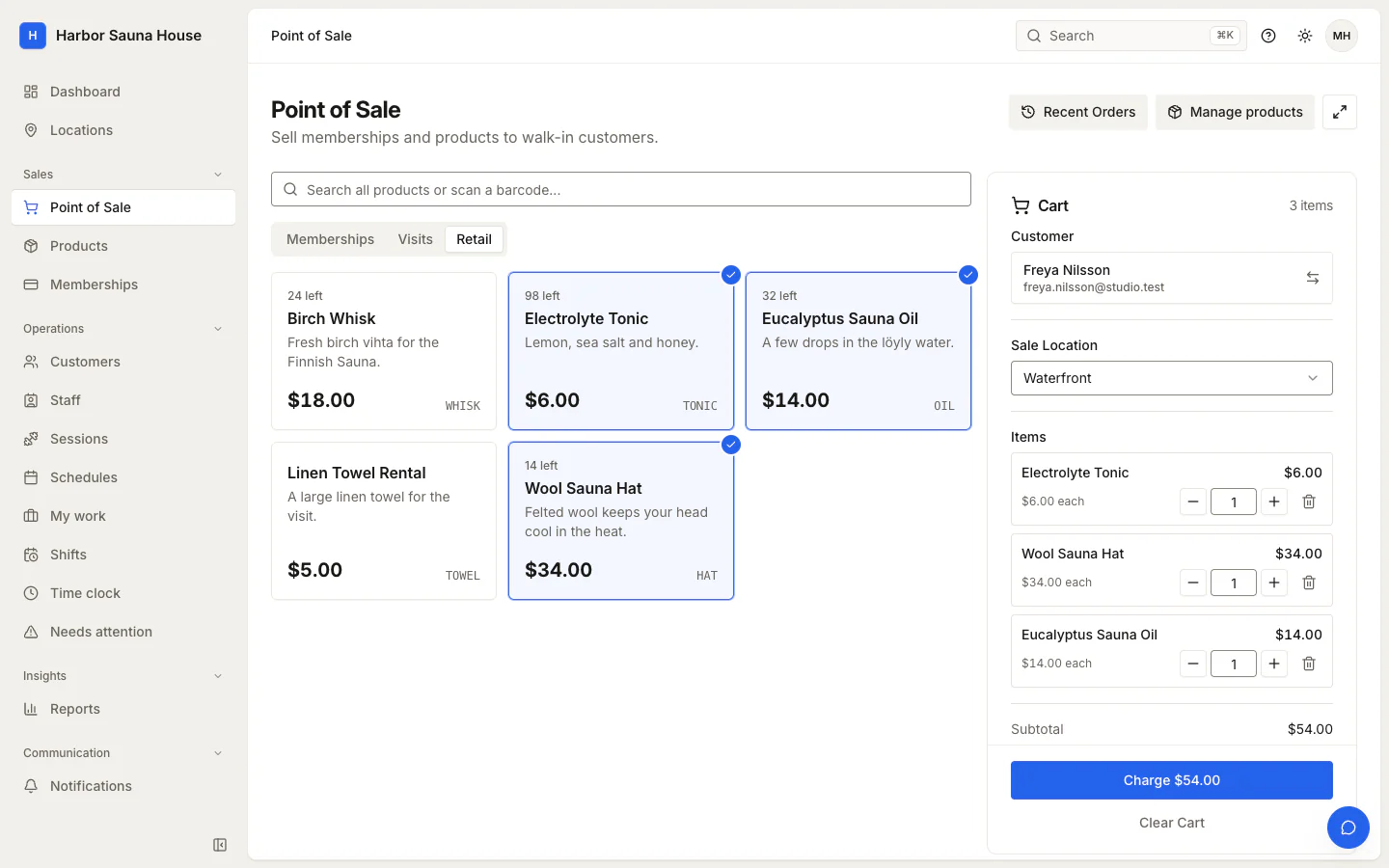
Ring up retail, drinks, add-ons, memberships and credit packs in one order at the front desk, and take card, cash or gift card. Sales go into your reports, and onto the customer's profile when you attach one.
Example: a sale at the front desk
- 1
After class
A customer wants a drink and a credit pack. Staff attach their profile, add both to the order and check the tax and total.
- 2
At the reader
Staff send the total to your Stripe or Square card reader, and the customer taps their card.
- 3
Payment approved
The pack is added to their account, so they can book their next class with its credits. The receipt goes to their email.
- 4
End of day
The sale is in your financial reports by category and item, at the location staff chose, beside your online sales.
Ring up products and plans
Build an order from your products, passes and packs, choose the location it's sold at and check the tax and total before taking payment.
- Card readers through Stripe or Square for products, memberships and packs.
- A customer's saved card, cash or a gift card for anything in the cart.
- Split a gift card with cash or an external card payment for the rest.
- A discount on the whole sale, for staff allowed to give one.
Reports, receipts, refunds, tax and stock
In your reports
Desk sales appear in your financial reports with online sales, by category and by item, and filter by the location they were sold at.
On the customer's profile
Attach a customer and the sale joins their billing history. A product sale doesn't need one; a plan does.
Receipts
Print a receipt at the desk, or email it to the customer attached to the sale.
Refunds
Refund a desk sale from the order. Card payments go back to the card.
Sales tax
A default tax rate for desk sales, with overrides for a location or a product.
Product stock
Track stock on the products you choose, set a low-stock threshold, and filter the product list to what needs reordering.
Guides and comparisons
Card processing fees for studios: what a drop-in, a pack and a membership really cost
Stripe and Square US rates as a share of each studio sale, why Stripe's 0.7% renewal fee decides which costs less, and the lowest price to sell online.
Sales tax on gym memberships: every US state, DC and Canada
Sales tax on gym memberships in all 50 states, DC and each Canadian province and territory, with classes, personal training, gift cards and local rates.
Elara vs Session for sauna studios
Session (bookasession.org) beside Elara: the same private hire, then a desk with no card reader connection and one waiver per booking, from Session's guides.
Elara vs WellnessLiving
WellnessLiving software and Elara compared: who holds the payment account and saved cards, card readers and Interac in Canada, and private hire of a session.
How it works in the help center
Point of sale (help center)
Sell memberships and products to walk-in customers and take card or cash payment.
POS card processing (help center)
How connected readers, external card payments, and cards on file work at Point of sale.
Products (help center)
Manage the products you sell at the point of sale, organize them into categories, set tax, and track stock.
Tax settings (help center)
Set your studio's default tax rate plus per-location and per-product rates.
Frequently asked questions
What can I sell through the point of sale?
Retail products, drinks and add-ons, membership plans and credit packs, in one order. A product sale doesn't need a customer attached; a membership does.
Do I need a card reader?
Only to take card payments at the desk, for products, memberships or packs. Without one, you can charge a customer's saved card, or take cash or a gift card.
Which card readers work with it?
Stripe's smart readers (WisePOS E, Reader S700 and Verifone P400) and Square Terminals, connected to your own account.
Can I keep my existing card terminal?
Yes. Take the payment on your terminal, then choose External card in Elara to record the sale as paid. Nothing is charged in Elara, so record it only after your terminal approves it.
Does the POS track stock?
Yes, for products you track stock on. The product list shows what's low or out of stock, and a low-stock threshold never stops a sale.
Can I sell a membership at the desk?
Yes. A monthly or yearly plan sold at the desk covers one term and doesn't renew on its own. For automatic renewals, the member buys it on your website. With Stripe, they can also turn on renewals from their account before the term ends, unless the plan adds sales tax at checkout.
Get a price for your studio
Tell us how many locations you run and what you use today. We'll email you a quote and, if you're switching, what we can bring across.